Agent Harnesses
An agent harness is the layer around the loop. The loop calls the model, reads state, decides, acts, and stops. The harness gives that loop a usable working environment: tools, files, memory, skills, permissions, subagents, approvals, traces, and recovery.
This is the part many people mistake for the agent itself. It is not the agent. It is the operating shell that makes the agent useful for real work.
The framework may provide a harness. The runtime may host a harness. But the responsibility does not disappear: something has to decide what the agent can see, what it can do, what state survives, what needs approval, what is traced, and how the run recovers.
This chapter owns the agent’s working environment. It does not own the model provider, business workflow, tool implementation, or fleet-wide production operations. The framework, application services, and production runtime own those concerns.
This chapter comes after the loop because the loop alone is too small for real work. Use it as the bridge from “what is the agent doing?” to “what environment keeps that work bounded?” The next production chapters take the same control ideas into runtime, observability, and security.
What You Should Be Able To Do
After this chapter, you should be able to:
- distinguish the agent loop from the harness around it;
- name the controls a harness must own before the agent can do real work;
- decide which harness features are needed for a given capability;
- evaluate harness behavior separately from model answer quality;
- identify framework defaults that need product-owned policy.
Harness Boundary
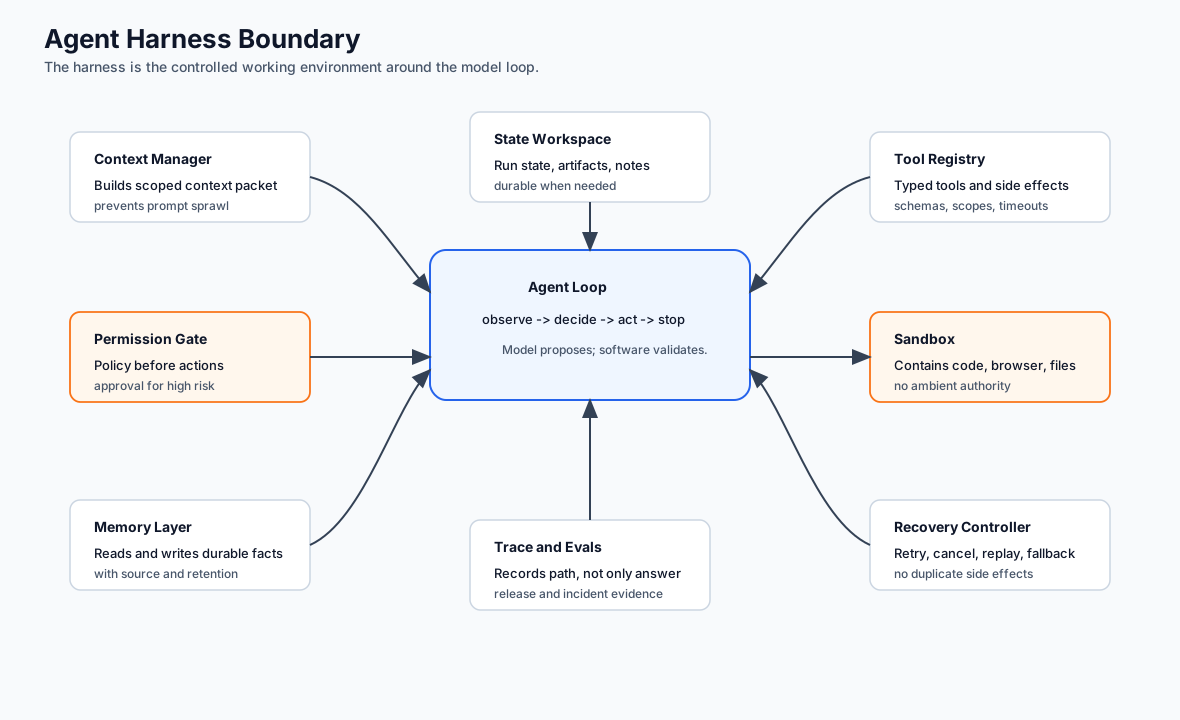
Use this diagram to separate the model loop from the environment that makes the loop safe and useful. The harness owns the controls around the loop: context, tools, policy, memory, traces, evals, sandboxing, and recovery.
Why Harnesses Exist
A raw agent loop is small enough to fit in a few functions. Real tasks need more than that: a place to keep intermediate work, a way to load only the context that matters, a way to call tools safely, a way to split work across subagents, a way to pause for approval, a way to remember useful facts, a way to recover after failure, and a way to inspect what happened afterward. All of that together is the harness.
Coding agents make the point obvious. A coding agent does not only call a model. It reads files, edits files, runs tests, tracks tasks, invokes tools, asks for approval, handles failures, and keeps a trace of the session. The model matters, but the harness is what decides whether the work is controlled.
Harness vs Framework vs Runtime
The terms overlap, but the distinction is worth keeping.
| Layer | Main Job | Examples Of Responsibility |
|---|---|---|
| Framework | Gives abstractions for building agents. | Model adapters, tool calling, chains, agents, prompts. |
| Runtime | Executes and operates agent work. | Durable state, retries, streaming, deployment, persistence. |
| Harness | Gives the agent a working environment. | Files, skills, memory, subagents, permissions, approvals, context management. |
A product may use all three. A framework may include a runtime, and a runtime may include harness features. The names matter less than the responsibilities, and the question that cuts through the overlap is simple: which layer owns which control?
If the answer is “the framework handles it”, keep asking. Which component stores state? Which component enforces permission? Which component owns memory writes? Which component can stop a side effect? Which component emits the trace? Those are harness responsibilities whether the code lives in your application or a framework.
Harness Responsibility Matrix
Use this matrix when reviewing a framework, SDK, or custom harness.
| Responsibility | Product Question | Harness Evidence |
|---|---|---|
| Context control | What did the model see for this call? | Context packet, omitted refs, trust labels. |
| Tool disclosure | Which tools were visible at this state? | Tool profile by route, role, and approval state. |
| Permission enforcement | Why was an action allowed or denied? | Policy decision with actor, target, mode, and reason. |
| Memory access | Why was memory read or written? | Memory policy ref, source ref, retention, deletion path. |
| Approval binding | What exact action did the human approve? | Approval ID tied to tool, args, actor, and expiry. |
| Recovery | Can this run resume or replay safely? | Checkpoints, idempotency keys, mocked-tool replay mode. |
| Observability | Can an operator reconstruct the run? | Trace events for proposal, validation, action, result, stop reason. |
If the harness cannot produce evidence for a row, that row is still a design risk, even if the demo works.
Core Harness Capabilities
A capable harness usually exposes these surfaces.
| Capability | What It Does | Main Risk |
|---|---|---|
| Workspace | Gives the agent files, artifacts, notes, and scratch state. | Sensitive data leakage or stale artifacts. |
| Context manager | Selects what enters the model context. | Token bloat, missing evidence, summarization drift. |
| Tool registry | Exposes tools with schemas and descriptions. | Broad tools, unsafe actions, weak authorization. |
| Skill loader | Loads procedural instructions only when needed. | Irrelevant activation or hidden unsafe scripts. |
| Memory layer | Reads and writes durable information. | Stale, private, or poisoned memory. |
| Planner | Tracks tasks, subtasks, and progress. | Plans become theater instead of control. |
| Subagent manager | Delegates work to isolated contexts. | Trace fragmentation and unclear ownership. |
| Permission gate | Blocks or pauses risky actions. | Prompt-only approval or approval fatigue. |
| Sandbox | Contains code, browser, shell, or file actions. | Escape, secret exposure, or uncontrolled network access. |
| Trace surface | Records decisions, tool calls, costs, and errors. | Final-answer-only logs. |
| Recovery controller | Handles retry, cancellation, replay, fallback, and escalation. | Duplicate side effects or lost progress. |
Not every agent needs every capability. A narrow support classifier may need almost none of this; a coding or research agent probably needs most of it.
Harness Contract
A harness should have an explicit run context. This is the object, or set of objects, that prevents the agent loop from becoming a pile of globals.
type HarnessRunContext = {
  runId: string;
  actorId: string;
  tenantId: string;
  goalId: string;
  autonomyLevel: "advisory" | "drafts_for_review" | "executes_after_approval" | "bounded_autonomous";
  stateRef: string;
  contextPacketId?: string;
  toolProfile: {
    allowedTools: string[];
    writeToolsRequireApproval: boolean;
    egressPolicyRef?: string;
  };
  memoryPolicyRef: string;
  approvalPolicyRef: string;
  budget: {
    maxIterations: number;
    maxCostCents: number;
    deadlineAt?: string;
  };
  traceId: string;
};
The exact shape can vary, but the harness should know the actor, tenant, goal, state, tools, memory policy, approval policy, budget, and trace before the model proposes the next action.
The same contract should make cancellation possible:
type HarnessStopReason =
  | "success"
  | "blocked"
  | "approval_required"
  | "budget_exhausted"
  | "cancelled"
  | "policy_denied"
  | "tool_failure";
If a harness cannot represent stop reasons, it will eventually turn different failures into the same vague error.
Workspace And Artifacts
Longer tasks need a workspace, and it fills up quickly with user-provided files, retrieved documents, generated drafts, code patches, plans, task notes, tool outputs, and evaluation results. None of that should be treated as a dumping ground. Files and artifacts need ownership, naming, retention, and visibility rules like any other state.
Good workspace design answers a handful of questions up front: what the agent can read, what it can write, what the user can inspect, what is temporary, what becomes durable state, and what must never enter the model context at all. The workspace is part of the security model, not separate from it.
The workspace also needs cleanup rules. Temporary files, generated drafts, tool outputs, downloaded documents, and logs should not accumulate until they become accidental memory. Keep retention, redaction, and deletion explicit.
Context Management
The harness decides what the model sees, and that decision is often more important than the prompt. A strong model with bad context still fails; a smaller model with clean context often works.
The context manager controls the instructions, the active goal, the current state, the relevant files, the retrieved evidence, the available tools, the selected memory, the recent observations, and the budget and stop rules. All of it should be loaded deliberately. Putting the whole workspace, the full conversation, every tool, all memory, and all retrieved documents into every call is not context engineering. It is context flooding. For the operating rules behind this, see Context Budgets And Working Sets; a harness should be able to explain the working set it assembled for each model call.
A good harness can answer, for every model call: which context packet was assembled, which files and memories were included, which tools were disclosed, which sources were omitted, and why.
Skills And Progressive Disclosure
Skills let a harness keep the base agent small. At startup the agent may see only the names and short descriptions of the available skills. When one becomes relevant, the harness loads the deeper instructions, references, scripts, templates, or examples behind it.
That is progressive disclosure, and it pays off across token budget, domain specialization, team-owned procedures, repeatable work, and safer tool use. Treat skills as versioned, tested artifacts rather than loose prompt fragments. A skill is procedural code and documentation that can change how the agent behaves, so it deserves the same discipline as any other code.
Subagents And Context Isolation
Subagents are worth reaching for when a task benefits from isolated context: when work can happen in parallel, when a specialist needs different instructions or different tools, when a task should not pollute the main context, or when the main agent should receive a summary rather than every detail. Do not use them as decoration. Every subagent adds cost, latency, coordination, and trace complexity.
The harness has to make subagent work visible: who delegated the task, what context was passed, what tools were available, what result came back, what evidence supports it, and how the main agent used it. If subagent work cannot be traced, it cannot be trusted.
Subagents should inherit less authority by default, not more. The harness should pass a scoped goal, a scoped context packet, a scoped tool profile, and a trace relationship back to the parent run.
Permissions And Approvals
The harness enforces permission boundaries before execution. The model can propose reading a file, calling an API, running a command, sending a message, updating a record, or writing a memory. The harness decides whether each of those is actually allowed.
Good permission systems draw distinctions the model cannot be trusted to draw for itself: read versus write, local versus remote, safe versus risky, reversible versus irreversible, user-visible versus hidden, cheap versus expensive, approved versus unapproved. Approval should be specific. “Allow tools” is too broad to mean anything. “Allow this agent to update ticket INC-2048 with this summary” is something a person can actually review.
The harness policy can be expressed as a simple gate:
interface ToolRequest {
  tool: string;
  mode: 'read' | 'write';
  target: string;
  userVisible: boolean;
}

function authorizeHarnessAction(request: ToolRequest, permissions: HarnessPermissions) {
  if (!permissions.tools.includes(request.tool)) {
    return { allowed: false, reason: 'tool_not_in_profile' };
  }

  if (request.mode === 'write' && !permissions.canWrite) {
    return { allowed: false, reason: 'write_not_allowed' };
  }

  if (request.userVisible && !permissions.hasApproval) {
    return { allowed: false, reason: 'approval_required' };
  }

  return { allowed: true };
}
That is the harness doing its job: model intent becomes a checked request before anything happens.
The same pattern should apply to memory writes, file writes, shell commands, browser actions, external messages, and handoffs. The model proposes. The harness validates. The tool or workflow executes.
Memory In A Harness
Harness memory is orchestration, not a new memory taxonomy. The harness decides when to read or write task-local state, durable memory, retrieved evidence, or procedural skills, but the policies live in the canonical layers: Working Memory, Memory-Augmented Agent, Semantic Recall And RAG, and Context Engineering.
The practical rule is simple: memory access is opt-in per task. Do not load global user memory, project memory, episodic memory, or retrieved documents just because they exist. Load them because they are relevant, allowed, fresh enough, and correctable. Write memory only through explicit events with source, scope, retention, and deletion rules.
Sandboxes
Harnesses become security-critical the moment they expose code execution, shell commands, browser control, or filesystem writes. A sandbox has to control filesystem access, network access, environment variables, secrets, installed packages, process lifetime, clipboard and browser-profile access, and upload and download paths.
The right default is least privilege: give the agent the narrowest environment that can still complete the task, and widen it only when a specific need forces you to.
Recovery And Replay
The harness owns what happens after interruption or failure. A serious harness can pause, cancel, retry, resume, replay, or escalate without losing track of state.
Recovery needs side-effect discipline:
- retries need idempotency keys;
- approvals need exact-action binding;
- file edits need diffs or snapshots;
- external messages need send records;
- memory writes need write IDs;
- tool calls need correlation IDs;
- replay should not repeat unsafe side effects.
A replay mode should be able to run with mocked tools, frozen context packets, and recorded model outputs when debugging. That is how teams compare prompt, model, policy, or tool changes without reissuing refunds, resending emails, or rewriting memory.
Harness Observability For Background Agents
Background agents need a harness that can be inspected after the fact. At minimum, capture:
- the initial task and acceptance criteria;
- selected files, tools, and models;
- tool calls with inputs, outputs, policy decisions, and errors;
- checkpoints or handoff summaries after major phases;
- final verification commands and their results.
Without this record, a background agent becomes an opaque worker. With it, the agent becomes reviewable infrastructure.
Harness Evaluation
Evaluate the harness directly. Freeze or mock the model response where possible so the test isolates harness behavior instead of model quality.
- Test context selection and exclusion.
- Test tool disclosure by route and role.
- Test permission denial before execution.
- Test approval waits and resume.
- Test cancellation before and during tool execution.
- Test retry with idempotency.
- Test memory write policy.
- Test subagent handoff traceability.
- Test sandbox boundaries.
- Test trace completeness after failure.
- Test replay without side effects.
Harness evals are different from answer evals. They ask whether the operating shell kept control when the model proposed something risky, incomplete, expensive, or wrong.
A harness fixture should describe the proposed trajectory and the controls that must hold:
type HarnessEvalCase = {
  caseId: string;
  proposedActions: Array<{
    tool: string;
    mode: "read" | "write";
    target: string;
  }>;
  expected: {
    disclosedTools: string[];
    deniedTools: string[];
    approvalRequiredFor: string[];
    maxIterations: number;
    maxCostCents: number;
    stopReason: HarnessStopReason;
    requiredTraceEvents: string[];
    repeatedSideEffects: 0;
  };
};
Keep a small set of blocking harness cases: forbidden tool disclosure, permission bypass, approval bypass, cross-tenant context, budget overrun, cancellation followed by a side effect, duplicate execution after retry, and replay that reaches a live write tool.
Measure tool-disclosure precision, permission-denial correctness, approval-bypass rate, budget-enforcement rate, cancellation latency, duplicate side effects, context-policy violations, trace completeness, replay isolation, and recovery success. Segment results by tool profile, autonomy level, and harness version.
For the shared eval case contract and release-gate method, see Evaluation-Driven Agent Development.
Harness Failure Modes
Harnesses fail in predictable ways. Every tool is available all the time. Every file enters context. Memory writes are invisible. Subagents create work nobody owns. Approvals are too broad. Sandbox boundaries are unclear. Traces omit tool inputs and outputs. Skills go stale but keep loading. Context compression removes the very evidence you need to debug the run. Every one of these is an architecture failure, not a model failure, which is exactly why a better model will not save you from them.
Add a few more to the list: cancellation does not stop queued side effects, retries duplicate work, subagents inherit broad permissions, framework defaults silently enable memory, workspace artifacts become hidden context, and replay is impossible because the harness did not store context packets or tool results.
Design Checklist
Before adopting or building a harness, ask:
- What does the harness own?
- What state does it persist?
- What can the model see?
- What can the model propose?
- What can the harness execute without approval?
- What tools are scoped by role or task?
- What files can be read or written?
- What memory can be written?
- What subagent work is traceable?
- What happens when the run is interrupted?
- What does the operator see after failure?
- How can a harness change be evaluated before release?
- How are context packets, tool calls, approvals, memory writes, and subagent runs linked in traces?
- How does the harness replay a run without repeating side effects?
- Which framework defaults have been replaced by product-owned policy?
If the harness cannot answer these, it is not ready to hold a serious agent.
Production Checklist
- Define the harness run context.
- Keep goal, state, context, tools, memory, approvals, budget, and trace linked.
- Disclose tools progressively by route and state.
- Enforce permissions outside the prompt.
- Bind approvals to exact actions.
- Make cancellation and pause real runtime states.
- Keep memory writes explicit, scoped, reviewable, and deletable.
- Scope subagents by context, tools, and permissions.
- Sandbox high-risk actions with filesystem, network, secret, and process limits.
- Support replay with mocked tools and no repeated side effects.
- Evaluate harness behavior separately from final-answer quality.
Design Rule
The model supplies judgment. The harness supplies control.
Once the harness contract is explicit, continue with Production Runtime Overview. That chapter moves from one agent’s working environment to queues, rollouts, budgets, recovery, and operators.