ReAct
ReAct alternates reasoning and acting. The agent reasons about current state, takes an action, observes the result, and repeats.
Source and downloads
Intent
ReAct alternates reasoning and acting. The agent reasons about current state, takes an action, observes the result, and repeats.
Use When
- The task requires tool use and the agent cannot know all required information upfront.
- Observations should change the next step.
- A bounded loop can stop on success, failure, or budget.
Avoid When
- The task is a deterministic workflow with known steps.
- You cannot validate actions before they run.
- The reasoning trace would expose sensitive information to users.
Architecture
Use this diagram to read ReAct as a system boundary, not only a code shape. The key ownership question is: the loop controller owns progress, budgets, stop conditions, and recovery state.
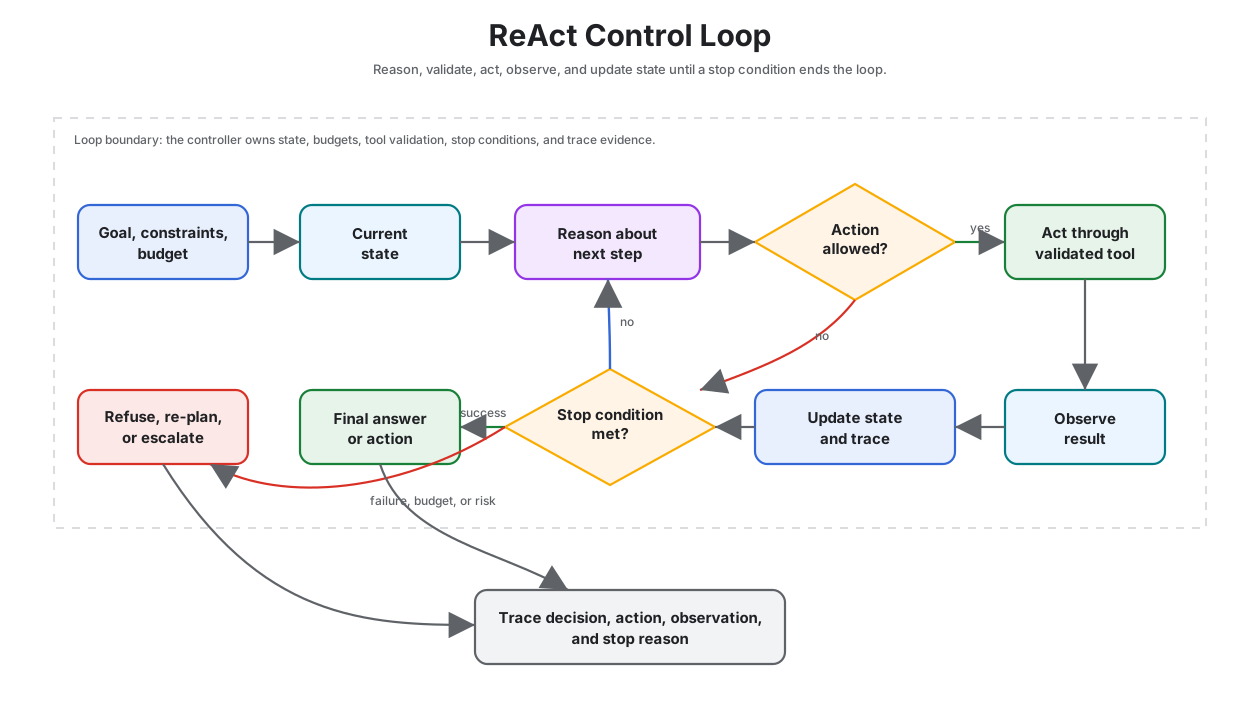
Read it as a bounded loop: each reasoning step must pass an action gate, each action must produce an observation, and each observation must update state or stop.
System Shape
- Pattern boundary: a controller repeatedly chooses the next step, executes it, observes the result, and decides whether to continue.
- State owner: the loop controller owns progress, budgets, stop conditions, and recovery state.
- Primary artifact:
react-pattern-reason-act/contains the runnable reference implementation and examples. - Operational promise: ReAct alternates reasoning and acting. The agent reasons about current state, takes an action, observes the result, and repeats.
- Runnable path: start with
npm run react-agentbefore adapting the pattern to a larger system.
Core Protocol
- Initialize goal state, constraints, budgets, and stop conditions.
- Choose the next action from the current state instead of assuming the whole path upfront.
- Execute the action through a validated tool, worker, or local function.
- Observe the result and update state with evidence, errors, and remaining work.
- Stop, retry, re-plan, or escalate according to explicit policy.
Implementation Notes
- Keep the pattern boundary explicit: inputs, state, side effects, and outputs should be visible.
- Validate model-produced decisions before they affect tools, users, or durable state.
- Emit enough trace data to debug failures after the run.
Failure Modes
- The pattern is applied where a simpler deterministic workflow would be better.
- State, tool calls, or model decisions are not observable enough to debug.
- The system lacks clear stop, retry, or escalation behavior.
Evaluation Strategy
- Test success cases, partial failure, repeated failure, budget exhaustion, and bad intermediate observations.
- Assert that the loop stops for the right reason and does not hide failed steps.
- Measure completion rate, number of iterations, recovery quality, cost, and latency.
- Include cases that prove each “Use When” condition is true for this pattern.
- Include negative cases from “Avoid When” so the system chooses a simpler or safer pattern when appropriate.
Production Checklist
- Set hard iteration, cost, and time limits.
- Persist state after meaningful steps if the run can be interrupted.
- Make retries idempotent or add compensation.
- Expose trace events for each decision, action, observation, and stop reason.
- Define human escalation for ambiguous, high-risk, or policy-blocked work.
- Keep the source bundle, generated chapter, tests, and deployment artifact in the same release.
Run the Example
npm run react-agent
Code Walkthrough
Read the excerpt as the smallest executable expression of the pattern. The surrounding chapter explains the design constraints; the code shows where those constraints become concrete interfaces, state, validation, or control flow.
Source Code
These excerpts show the implementation shape. The complete code is available in the download bundle and repository source.
react-pattern-reason-act/autogen_typescript_example/react_agent.ts
// ReAct Pattern (Reason + Act) - Autogen TypeScript Example
// To run: npm install && npm run react-agent

import axios from 'axios';
import * as readline from 'readline';
import { evaluate } from 'mathjs';
import * as dotenv from 'dotenv';
dotenv.config();

const MISTRAL_API_URL = 'https://api.mistral.ai/v1/chat/completions';
const MISTRAL_API_KEY = process.env.MISTRAL_API_KEY;

function calculatorTool(input: string): string {
  try {
    const val = evaluate(input);
    return val.toString();
  } catch (e) {
    return `Error: ${e}`;
  }
}

async function reactAgent(userInput: string): Promise<string> {
  let context = userInput;
  let done = false;
  let result = '';
  while (!done) {
    // Step 1: Reason
    const reasoningPrompt = `You are an agent. Think step by step about what to do next. If you need to use a tool, say TOOL: <expression>. If you are done, say FINAL: <answer>.\nContext: ${context}`;
    const response = await axios.post(
      MISTRAL_API_URL,
      {
        model: 'mistral-tiny',
        messages: [{ role: 'user', content: reasoningPrompt }],
      },
      {
        headers: {
          'Authorization': `Bearer ${MISTRAL_API_KEY}`,
          'Content-Type': 'application/json',
        },
      }
    );
    const agentOutput = response.data.choices[0].message.content.trim();
    console.log('Agent:', agentOutput);
    if (agentOutput.startsWith('TOOL:')) {
      const expr = agentOutput.replace('TOOL:', '').trim();
      const toolResult = calculatorTool(expr);
      context += `\nTool result: ${toolResult}`;
    } else if (agentOutput.startsWith('FINAL:')) {
      result = agentOutput.replace('FINAL:', '').trim();
      done = true;
    } else {
      // If the agent doesn't follow the protocol, end loop
      result = agentOutput;
      done = true;
    }
  }
  return result;
}

async function main() {
  const idx = process.argv.indexOf('--input');
  const cliInput = idx !== -1 ? process.argv[idx + 1] : undefined;
  const nonInteractive = cliInput || process.env.NON_INTERACTIVE_INPUT;
  if (nonInteractive) {
    try {
      const agentResponse = await reactAgent(String(nonInteractive));
      console.log('Final Answer:', agentResponse);
    } catch (err) {
      console.error('Error:', err);
      process.exitCode = 1;
    }
    return;
  }
  const rl = readline.createInterface({ input: process.stdin, output: process.stdout });
  rl.question('Task: ', async (userInput: string) => {
    try {
      const agentResponse = await reactAgent(userInput);
      console.log('Final Answer:', agentResponse);
    } catch (err) {
      console.error('Error:', err);
    }
    rl.close();
  });
}

main();
react-pattern-reason-act/langgraph_python_example/react_agent.py
# ReAct Pattern (Reason + Act) - LangGraph Python Example
This example demonstrates the ReAct Pattern using LangGraph and Python. The agent alternates between reasoning and acting (using a calculator tool), and iteratively solves the task. The LLM is Mistral.
## Requirements
- Python 3.8+
- `langgraph` library
- `python-dotenv` (for .env support)
- Mistral LLM API access
## Install dependencies
```bash
pip install langgraph python-dotenv requests
```
## Example Code
```python
import os
from langgraph import Agent, Environment, LLM, Tool
from dotenv import load_dotenv
load_dotenv()
MISTRAL_API_KEY = os.getenv("MISTRAL_API_KEY")
MISTRAL_API_URL = "https://api.mistral.ai/v1/chat/completions"
import sympy as _sp
def safe_calc(expr: str) -> str:
try:
return str(_sp.sympify(expr, evaluate=True))
except Exception as e:
return f"Error: {e}"
class CalculatorTool(Tool):
def call(self, input_str):
return safe_calc(input_str)
class SimpleEnvironment(Environment):
def get_observation(self):
return input("Task: ")
def send_action(self, action):
print(f"Agent: {action}")
class ReActAgent(Agent):
def __init__(self, llm, tools):
self.llm = llm
self.tools = {tool.name: tool for tool in tools}
def act(self, observation):
context = observation
while True:
prompt = (
"You are an agent. Think step by step about what to do next. "
"If you need to use a tool, say TOOL: <expression>. "
"If you are done, say FINAL: <answer>.\nContext: " + context
)
response = self.llm.complete(prompt)
print(f"Agent: {response}")
if response.startswith("TOOL:"):
expr = response.replace("TOOL:", "").strip()
tool_result = self.tools["calculator"].call(expr)
context += f"\nTool result: {tool_result}"
elif response.startswith("FINAL:"):
return response.replace("FINAL:", "").strip()
else:
return response
llm = LLM(
provider="mistral",
api_key=MISTRAL_API_KEY,
api_url=MISTRAL_API_URL,
)
calc_tool = CalculatorTool(name="calculator")
env = SimpleEnvironment()
agent = ReActAgent(llm, [calc_tool])
observation = env.get_observation()
action = agent.act(observation)
env.send_action(action)
```
---
- Try a multi-step math or logic task to see reasoning and tool use.
- Make sure your `.env` file contains your Mistral API key.
Download
The download bundle contains the current react-pattern-reason-act/ folder from this repository.