Building a Minimal Agent Runtime
This chapter explains the small runtime behind the from-scratch mini-framework labs. You do not build it because production teams should avoid mature frameworks. You build it because a tiny runtime makes the real architecture visible.
Frameworks change APIs and vocabulary. The same responsibilities keep coming back: state, decisions, tools, policy, context, traces, evals, and stop conditions. Once you can build those primitives in a small runtime, LangGraph, Mastra AI, AutoGen-style systems, CrewAI, MCP, A2A, and custom harnesses are easier to evaluate.
What You Should Be Able To Do
After this chapter, you should be able to:
- identify the runtime primitives hidden inside agent frameworks;
- explain why the model proposes decisions but the runtime executes them;
- build a tiny loop with state, policy, tools, context, traces, and stop reasons;
- compare framework features by responsibility instead of vocabulary;
- know when the learning runtime should give way to production infrastructure.
Why Build One
Most agent failures are not mysterious model failures. They are runtime failures.
The system did not know who owned state. The tool list was too broad. Policy lived in a prompt. The loop had no stop reason. Context was assembled by dumping everything into the model. A final answer looked acceptable, but the path used a forbidden tool. None of those are fixed by changing framework names.
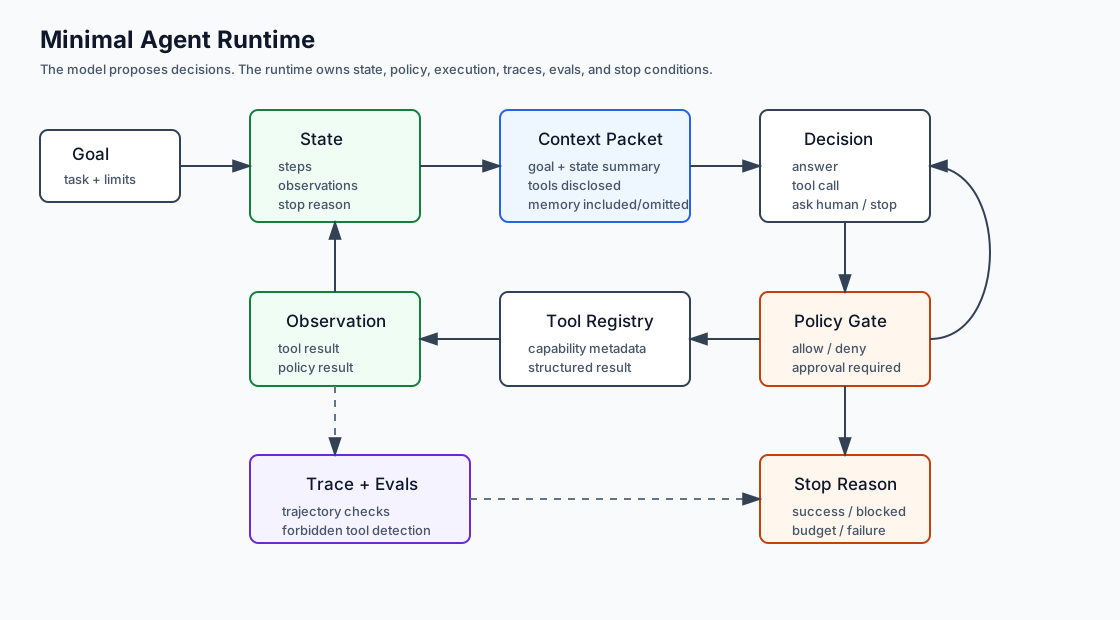
A minimal runtime teaches the control boundary:
goal
  -> build context
  -> ask for a decision
  -> validate the decision
  -> check policy
  -> execute allowed work
  -> record observation
  -> evaluate stop condition
That is the shape hidden under many framework abstractions.
Use this diagram to keep the runtime responsibilities separate. The model proposes a decision, but the runtime owns validation, policy, execution, observation, and stop conditions.
What This Runtime Is Not
This is not a production framework. It does not try to solve deployment, streaming, distributed execution, persistence, authentication, workflow queues, model adapters, UI integration, tracing backends, or memory stores.
Use it as a learning scaffold. Use mature frameworks when you need production durability, operational integrations, concurrency, checkpoints, retries, hosted observability, and ecosystem support.
Runtime Readiness Record
Before adapting the mini-runtime to a real system, write down which primitives are learning-only and which are production-owned.
runtime_readiness:
  purpose: "learning scaffold"
  state:
    owner: "mini-runtime"
    production_gap: "no durable checkpoints"
  tools:
    owner: "tool registry"
    production_gap: "no tenant-scoped authorization service"
  policy:
    owner: "local policy gate"
    production_gap: "no central audit trail"
  context:
    owner: "context builder"
    production_gap: "no retrieval freshness or redaction pipeline"
  trace:
    owner: "local trace events"
    production_gap: "no hosted observability backend"
  decision: "use for labs only; migrate to mature runtime before real side effects"
The record prevents the common mistake: treating a useful educational runtime as if it already has production durability, security, and operations.
Primitive 1: State
State is the source of truth for the run. The transcript is not enough. A transcript says what was said; state says what the system is trying to do, what happened, what was observed, what remains, and why the run stopped.
type StopReason =
  | "success"
  | "blocked"
  | "approval_required"
  | "budget_exhausted"
  | "invalid_decision"
  | "policy_denied"
  | "tool_failure";

type Observation = {
  id: string;
  kind: "model" | "tool" | "policy" | "human" | "system";
  summary: string;
  data?: unknown;
};

type AgentState = {
  runId: string;
  goal: string;
  steps: number;
  maxSteps: number;
  observations: Observation[];
  stopReason?: StopReason;
};
Good state lets you resume, replay, debug, evaluate, and explain a run. Bad state forces operators to infer behavior from final text.
Primitive 2: Decision
A model response is a proposal. The runtime turns that proposal into a typed decision before it can affect tools, users, durable state, or external systems.
type Decision =
  | { kind: "answer"; text: string }
  | { kind: "tool"; name: string; input: unknown }
  | { kind: "ask_human"; question: string }
  | { kind: "stop"; reason: StopReason };
This is the most important split in the runtime: the model can suggest, but software validates and executes.
Primitive 3: Loop
The loop owns progress. It repeatedly builds context, asks for a decision, validates that decision, executes allowed work, records observations, and stops.
async function runAgent(
  state: AgentState,
  decide: (context: ContextPacket) => Promise<Decision>,
): Promise<AgentState> {
  while (state.steps < state.maxSteps) {
    const context = buildContext(state);
    const decision = await decide(context);
    const result = await handleDecision(state, decision);

    state.observations.push(result.observation);
    state.steps += 1;

    if (result.stopReason) {
      state.stopReason = result.stopReason;
      return state;
    }
  }

  state.stopReason = "budget_exhausted";
  return state;
}
The loop should never run because the model keeps asking. It runs because the runtime still has budget, policy allows the next step, and stop conditions have not been met.
Primitive 4: Tool Registry
Tools are capabilities. A registry defines the capabilities the runtime can expose.
type ToolResult =
  | { status: "ok"; data: unknown }
  | { status: "refused"; reason: string }
  | { status: "error"; reason: string };

type ToolDefinition = {
  name: string;
  description: string;
  sideEffect: "read" | "draft" | "write";
  execute(input: unknown): Promise<ToolResult>;
};
Keep tools narrow. Prefer lookup_order_summary over run_sql, draft_refund_request over post_http, and search_policy_docs over unrestricted browser or shell access.
Primitive 5: Policy Gate
The registry says what exists. Policy decides what is allowed now.
type PolicyDecision =
  | { status: "allow" }
  | { status: "deny"; reason: string }
  | { status: "approval_required"; reason: string };

type PolicyContext = {
  actorId: string;
  route: string;
  approvedActionIds: string[];
  remainingSteps: number;
};
A useful policy gate considers actor, route, tenant, tool, side effect, approval state, data sensitivity, and budget. A prompt that says “do not do dangerous things” is not a policy gate.
Primitive 6: Context Packet
Context is not everything the system knows. It is the working set for one decision.
type ContextPacket = {
  runId: string;
  goal: string;
  stateSummary: string;
  observations: Array<{ id: string; summary: string }>;
  toolsDisclosed: string[];
  evidenceRefs: string[];
  memoryRefs: string[];
  omittedRefs: Array<{ ref: string; reason: string }>;
};
The runtime should be able to explain why each item entered the context and why other available material stayed out.
Primitive 7: Trace
Traces make behavior reviewable. Without them, debugging collapses into reading final answers and guessing.
type TraceEvent = {
  runId: string;
  step: number;
  type:
    | "context_built"
    | "decision"
    | "policy_decision"
    | "tool_result"
    | "stop";
  data: unknown;
};
Trace events should connect the model decision, policy result, tool call, observation, cost, latency, and stop reason.
Primitive 8: Eval Harness
Agent evals should inspect paths, not only answers.
type EvalCase = {
  caseId: string;
  input: string;
  expected: {
    toolsCalled?: string[];
    toolsNotCalled?: string[];
    stopReason: StopReason;
  };
};
Useful evals catch forbidden tools, missing evidence, approval bypasses, invalid decisions, repeated side effects, and budget exhaustion. A plausible final answer is not enough if the trajectory was unsafe.
How This Maps to Frameworks
| Runtime Primitive | LangGraph | Mastra AI | AutoGen-style Systems | CrewAI |
|---|---|---|---|---|
| State | graph state and checkpoints | workflow and memory state | conversation/session state | flow state |
| Decision | node output or router result | agent response or workflow step | agent message | task output |
| Loop | graph traversal | workflow/agent runtime | conversation turn loop | flow execution |
| Tool registry | tools bound to nodes or agents | tools | callable functions/tools | role tools |
| Policy gate | guard node or middleware | workflow/tool policy | manager or wrapper | flow guard or task constraint |
| Context packet | node input state | agent context and memory | message set | task context |
| Trace | callbacks and checkpoints | observability/evals | logs and messages | task and flow logs |
| Eval harness | graph-level tests | eval suites | transcript/trajectory tests | task/flow quality checks |
Frameworks can package these primitives, but they do not remove the need to design them.
The important comparison is responsibility, not API shape:
| Question | If You Build It Yourself | If You Use A Framework |
|---|---|---|
| Who owns state? | Your runtime data model and persistence plan. | The framework may provide state containers or checkpoints, but your application still defines the business state. |
| Who authorizes tools? | Your policy function, approval records, and audit trail. | The framework can expose hooks or middleware, but product policy still belongs outside the prompt. |
| Who assembles context? | Your context builder chooses memory, evidence, tools, and omissions. | The framework can provide memory abstractions, but you still need source, freshness, and privacy rules. |
| Who evaluates behavior? | Your tests inspect decisions, tools, traces, and stop reasons. | The framework can run evals, but you still decide what unsafe or low-quality behavior means. |
| Who handles production failures? | You must add retries, idempotency, durability, alerts, and incident workflow. | Mature runtimes can provide pieces of this, but they must be configured against your risk model. |
What the Labs Do
The mini-framework labs implement the primitives in three passes:
- Lab 09 - Minimal Agent Loop builds state, decisions, loop control, and stop reasons.
- Lab 10 - Tool Registry and Policy Gate adds tools, policy decisions, approval-required outcomes, and refusal paths.
- Lab 11 - Context, Memory, Trace, and Evals adds context packets, scoped memory, trace events, and trajectory evals.
Do the labs if you want implementation intuition. Read this chapter alone if you only need the mental model.
Design Rule
Build the tiny runtime to learn. Ship with mature runtime capabilities when the system must survive real users, real data, real side effects, and real incidents.