MCP-first Tool Use
MCP-first tool use separates tool capability from agent logic through manifests, validation, invocation, and structured results.
Source and downloads
Intent
Use this pattern when the set of tools may evolve independently from the agent. MCP gives tools a manifest boundary so the agent can inspect capabilities instead of relying on hard-coded assumptions.
Use When
- Tools are shared across agents or applications.
- Tool schemas, context, and permissions need to be discoverable.
- You want to test tool invocation separately from model reasoning.
Avoid When
- A local function call is enough and no discovery boundary is needed.
- Tool inputs cannot be validated.
- The agent has permission to call too many tools without policy checks.
Architecture
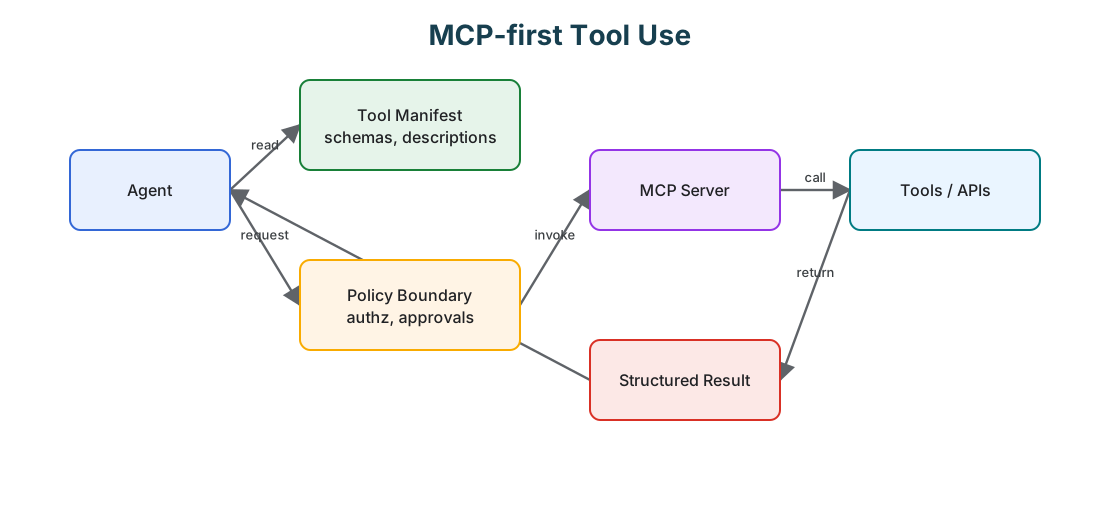
Use this diagram to read MCP-first Tool Use as a system boundary, not only a code shape. The key ownership question is: the protocol or capability boundary owns schemas, permissions, invocation records, and response validation.
System Shape
- Pattern boundary: the agent discovers or selects a capability, submits a typed request, and receives a typed result across a policy boundary.
- State owner: the protocol or capability boundary owns schemas, permissions, invocation records, and response validation.
- Primary artifact:
modern-tool-use-pattern/contains the runnable reference implementation and examples. - Operational promise: MCP-first tool use separates tool capability from agent logic through manifests, validation, invocation, and structured results.
- Runnable path: start with
npm run mcp:searchbefore adapting the pattern to a larger system.
Core Protocol
- Discover the capability, schema, permissions, and operating constraints.
- Prepare a typed request from the current goal and state.
- Authorize the request before invocation.
- Invoke the tool, skill, or remote agent and validate the result.
- Return structured output, refusal, progress, or error without losing correlation IDs.
Implementation Notes
- Validate tool input before every invocation.
- Keep tool results structured and observable.
- Put policy checks between model intent and tool execution.
- Prefer small tools with clear contracts over broad tools with vague descriptions.
Failure Modes
- Tool manifests that describe capabilities too vaguely.
- Model-generated tool inputs used without schema validation.
- Hidden side effects that are not visible in the tool contract.
- No trace linking model decision, tool input, and tool result.
Evaluation Strategy
- Test valid calls, invalid arguments, unauthorized calls, timeouts, refusals, and malformed responses.
- Assert that dangerous actions require approval or are blocked before execution.
- Measure tool-selection accuracy, schema validity, authorization failures, and recovery behavior.
- Include cases that prove each “Use When” condition is true for this pattern.
- Include negative cases from “Avoid When” so the system chooses a simpler or safer pattern when appropriate.
Production Checklist
- Use typed schemas for inputs and outputs.
- Separate model intent from actual execution permissions.
- Add timeouts, retries, idempotency keys, and audit records.
- Treat refusal and cancellation as first-class outcomes.
- Define human escalation for ambiguous, high-risk, or policy-blocked work.
- Keep the source bundle, generated chapter, tests, and deployment artifact in the same release.
Run the Example
npm run mcp:search
npm run mcp:cloud
npm run mcp:agent
npm run mcp:test
Code Walkthrough
Read the excerpt as the smallest executable expression of the pattern. The surrounding chapter explains the design constraints; the code shows where those constraints become concrete interfaces, state, validation, or control flow.
Source Code
These excerpts show the implementation shape. The complete code is available in the download bundle and repository source.
modern-tool-use-pattern/typescript/src/agent.ts
import axios from 'axios';
import Ajv from 'ajv';
import { pathToFileURL } from 'node:url';

const ajv = new Ajv({ allErrors: true, strict: true });

async function getManifest(base: string) {
  const { data } = await axios.get(`${base}/manifest`);
  return data;
}

async function invoke(base: string, tool: string, input: any) {
  const { data } = await axios.post(`${base}/invoke`, { tool, input });
  if (!data?.ok) throw new Error(data?.error || 'invoke_failed');
  return data.output;
}

export async function runScenario() {
  // Discover tools via MCP manifests
  const search = await getManifest('http://localhost:3031');
  const cloud = await getManifest('http://localhost:3032');
  // Validate inputs before invoking
  const searchSchema = search.tools.find((t: any) => t.name === 'search.query')?.input_schema;
  const cloudStoreSchema = cloud.tools.find((t: any) => t.name === 'cloud.store')?.input_schema;
  const vSearch = ajv.compile(searchSchema);
  const vCloudStore = ajv.compile(cloudStoreSchema);
  // Plan (deterministic): search for a topic, then store results in cloud
  const q = 'agents';
  const inputSearch = { q, limit: 2 };
  if (!vSearch(inputSearch)) throw new Error('bad search input');
  const { items } = await invoke('http://localhost:3031', 'search.query', inputSearch);
  const doc = { topic: q, titles: items.map((i: any) => i.title) };
  const inputStore = { key: `topic:${q}`, value: doc };
  if (!vCloudStore(inputStore)) throw new Error('bad cloud.store input');
  await invoke('http://localhost:3032', 'cloud.store', inputStore);
  return doc;
}

async function main() {
  const out = await runScenario();
  console.log('Stored doc:', out);
}

if (process.argv[1] && import.meta.url === pathToFileURL(process.argv[1]).href) {
  main().catch(err => { console.error(err); process.exit(1); });
}
modern-tool-use-pattern/typescript/src/mcp_search_server.ts
import express from 'express';
import type { Request, Response } from 'express-serve-static-core';

const app = express();
app.use(express.json());

const manifest = {
  name: 'search-tools',
  version: '1.0.0',
  tools: [
    {
      name: 'search.query',
      description: 'Mock web search returning titles for a query',
      input_schema: {
        type: 'object',
        required: ['q'],
        properties: {
          q: { type: 'string' },
          limit: { type: 'number', minimum: 1, maximum: 5 }
        },
        additionalProperties: false
      }
    }
  ]
};

app.get('/manifest', (_req: Request, res: Response) => res.json(manifest));

app.post('/invoke', (req: Request, res: Response) => {
  const { tool, input } = req.body || {};
  if (tool === 'search.query') {
    const q = String(input?.q || '').trim();
    const limit = Math.max(1, Math.min(5, Number(input?.limit ?? 3)));
    const items = Array.from({ length: limit }, (_, i) => ({ title: `${q} result ${i + 1}` }));
    return res.json({ ok: true, output: { items } });
  }
  return res.status(400).json({ ok: false, error: 'unknown_tool' });
});

app.listen(3031, () => console.log('MCP search server on 3031'));
modern-tool-use-pattern/typescript/src/mcp_cloud_server.ts
import express from 'express';
import type { Request, Response } from 'express-serve-static-core';

const app = express();
app.use(express.json());

const store = new Map<string, any>();

const manifest = {
  name: 'cloud-store',
  version: '1.0.0',
  tools: [
    {
      name: 'cloud.store',
      description: 'Store a JSON document under a key',
      input_schema: {
        type: 'object',
        required: ['key', 'value'],
        properties: { key: { type: 'string' }, value: { type: 'object' } },
        additionalProperties: false
      }
    },
    {
      name: 'cloud.fetch',
      description: 'Fetch a document by key',
      input_schema: {
        type: 'object',
        required: ['key'],
        properties: { key: { type: 'string' } },
        additionalProperties: false
      }
    }
  ]
};

app.get('/manifest', (_req: Request, res: Response) => res.json(manifest));

app.post('/invoke', (req: Request, res: Response) => {
  const { tool, input } = req.body || {};
  if (tool === 'cloud.store') {
    store.set(String(input.key), input.value);
    return res.json({ ok: true });
  }
  if (tool === 'cloud.fetch') {
    return res.json({ ok: true, output: { value: store.get(String(input.key)) ?? null } });
  }
  return res.status(400).json({ ok: false, error: 'unknown_tool' });
});

app.listen(3032, () => console.log('MCP cloud server on 3032'));
Download
The download bundle contains the current modern-tool-use-pattern/ folder from this repository.