Deployment Walkthrough
This walkthrough turns a lab-derived agent into a production candidate. It is framework-agnostic: the same gates apply whether the implementation uses direct TypeScript, Python, LangGraph, AutoGen, Mastra, CrewAI, or a custom mini-runtime.
Download the deployment walkthrough review checklist before using this chapter for a release review.
For complete examples, use the Capstone Projects after this chapter.
The goal is not to deploy faster. The goal is to deploy with enough control that the team can inspect, stop, replay, and improve the system after real users arrive.
Scope
Use this walkthrough for systems that can read private data, call tools, write memory, send messages, create drafts, execute workflow steps, or influence business decisions.
For throwaway demos, keep the process lighter. For production, do not skip the gates that match the system’s authority.
Deployment Readiness Questions
Use these questions before promoting a lab, pattern implementation, or capstone into a service:
| Question | Release Evidence |
|---|---|
| What authority does the agent have? | Read, write, approval, tool, memory, and user-facing action inventory. |
| What must be durable? | Checkpoints for approvals, retries, side effects, and workflow waits. |
| What blocks release? | Tests, evals, trace review, policy checks, and security gates. |
| What can be disabled without deploy? | Model route, prompt version, tool capability, memory writes, workflow, or full agent route. |
| What can operators inspect? | Runbook, trace dashboard, eval dashboard, config version, and incident log. |
| What happens during partial failure? | Retry, compensation, degradation, escalation, and stop reason rules. |
The release is not ready when the only proof is “the demo worked.” It is ready when a second engineer can deploy, inspect, stop, and replay it.
Release Pipeline
Use this diagram as the deployment control path. A production agent release needs local evidence, eval gates, canary observation, rollback controls, and incident-to-eval feedback.
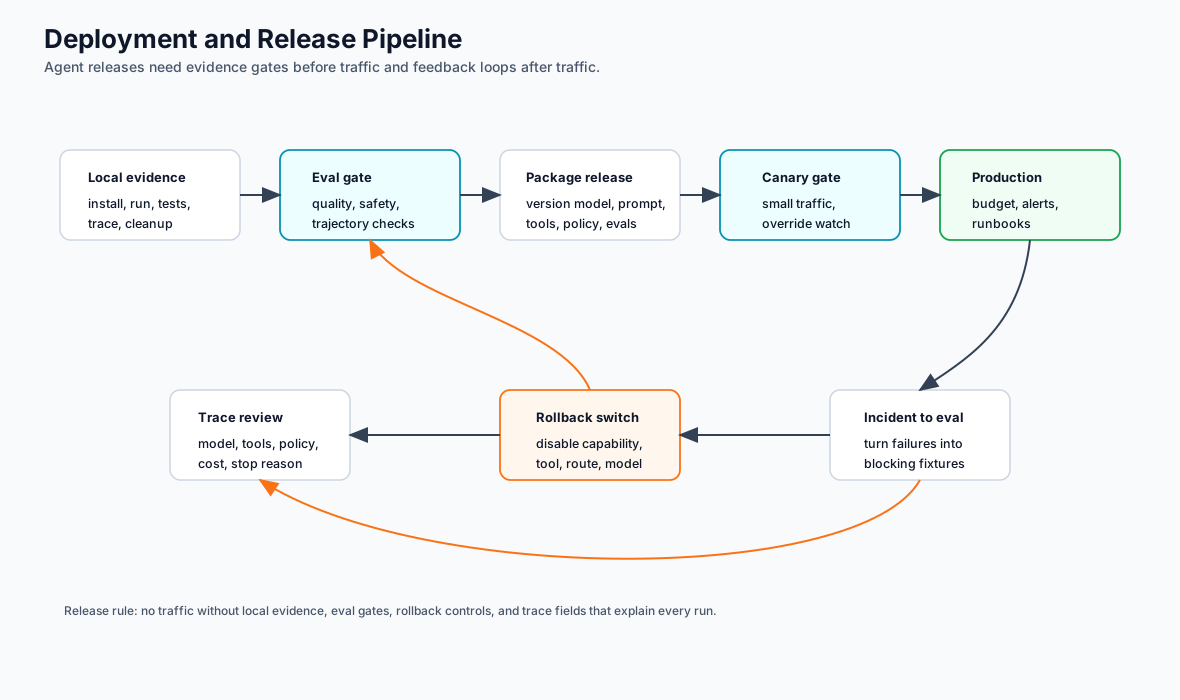
1. Local Development
Local development should prove the runtime contract before cloud infrastructure exists.
Required local evidence:
| Evidence | Required Proof |
|---|---|
| install | clean checkout can install dependencies |
| run | one command executes the vertical slice |
| test | unit and trajectory tests pass |
| eval | at least one release-blocking eval runs locally |
| trace | local run emits structured trace events |
| cleanup | local state and temporary data can be removed |
Suggested local commands:
npm test
npm run typecheck
npm run book:build
For Python framework variants, add the project-specific virtual environment, install, test, and eval commands to the lab README.
2. Configuration And Secrets
Configuration should make deployment behavior explicit without exposing secrets.
Use these environment groups:
| Group | Examples |
|---|---|
| model provider | OPENAI_API_KEY, model name, timeout, retry limit |
| runtime | environment, region, service name, release version |
| storage | checkpoint store URL, trace store URL, memory store URL |
| policy | policy version, approval mode, disabled capabilities |
| observability | trace export endpoint, sampling mode, redaction mode |
| evals | eval dataset version, release threshold, failure mode |
Rules:
- commit
.env.example, not.env; - keep secrets in the deployment platform’s secret manager;
- fail startup when required secrets are missing;
- log which configuration version loaded, not secret values;
- treat prompt, model, tool, policy, and eval versions as release inputs.
3. Persistence And Checkpointing
Persistence depends on authority. A read-only answer can often be stateless. A workflow that waits for approval, retries tools, or creates side effects needs durable state.
Choose the minimum persistence boundary that supports recovery:
| Need | Persistence Boundary |
|---|---|
| request-only answer | request log plus trace |
| conversation continuity | thread state or conversation store |
| human approval wait | checkpoint plus approval record |
| tool side effect | idempotency key plus side-effect record |
| long-running workflow | workflow state plus step checkpoints |
| memory | governed memory store with retention and deletion |
Checkpoint every externally visible step:
- accepted request;
- planned action;
- policy decision;
- approval request or approval result;
- tool call attempt;
- side-effect result;
- final response;
- eval or post-run quality result.
Retries should read the checkpoint and decide whether to continue, compensate, or stop. They should not replay side effects blindly.
4. Observability Export
Agent observability must explain one run and aggregate many runs.
Export these events:
| Event | Required Fields |
|---|---|
| run | trace ID, run ID, actor, tenant, environment, release |
| model | model, prompt version, input reference, output status, tokens, cost, latency |
| tool | tool name, redacted arguments, authorization, status, retry count, idempotency key |
| retrieval | source IDs, freshness, access decision, citation requirements |
| memory | read IDs, write IDs, retention class, policy basis |
| policy | policy version, decision, reason code, enforcement effect |
| approval | approver role, exact action, expiry, result |
| eval | case ID, evaluator version, score, threshold, pass/fail |
Do not store raw secrets, credentials, payment data, or private content unless the retention policy explicitly allows it. Prefer references to encrypted records when raw content is not needed for debugging.
5. Eval Gate In CI
CI should block risky changes before deployment.
Tie eval subsets to change type:
| Change | Blocking Eval |
|---|---|
| prompt | task success, schema validity, policy compliance |
| model | task success, refusal behavior, tool argument quality, cost |
| tool | authorization, idempotency, error handling |
| retrieval | source access, freshness, citation correctness |
| memory | read scope, write policy, deletion behavior |
| workflow | route correctness, retry, cancellation, resume |
| policy | false allow, false deny, approval routing |
A minimal CI gate should run:
npm test
npm run typecheck
Add project-specific eval commands next to the implementation. The gate should fail closed: if the eval dataset cannot load, the release should stop.
GitHub Actions Gate
A minimal GitHub Actions workflow should separate ordinary tests from release-blocking agent checks.
name: agent-release-gate

on:
  pull_request:
  workflow_dispatch:

jobs:
  verify:
    runs-on: ubuntu-latest
    steps:
      - uses: actions/checkout@v4
      - uses: actions/setup-node@v4
        with:
          node-version: 20
          cache: npm
      - run: npm ci
      - run: npm test
      - run: npm run typecheck --if-present
      - run: npm run eval:release --if-present
      - run: npm run trace:contract --if-present
For Python agents, add setup-python, dependency install, unit tests, and eval commands. Keep production secrets out of pull-request jobs. CI should use synthetic fixtures, mock tools, redacted traces, and staging credentials only when explicitly approved.
The release gate should publish a small evidence summary: commit SHA, eval dataset version, passed checks, failed checks, trace contract result, and release owner. A green CI badge is not enough when the agent can call tools or affect users.
6. Rollout
Roll out by capability, not by hope.
Use stages:
- local run with deterministic fixtures;
- staging run with synthetic data;
- internal run with read-only authority;
- limited tenant or cohort;
- expanded traffic with dashboards and alerts;
- full release after trace and eval review.
At each stage, record:
- release version;
- model and prompt version;
- tool schema version;
- policy version;
- eval dataset version;
- trace export status;
- rollback owner.
Rollout Decision Flow
Use this flow at each rollout stage. The goal is to make expansion a decision based on evidence, not a default next step.
7. Rollback And Kill Switch
Every production agent needs a fast disable path.
Define kill switches at several layers:
| Layer | Disable Action |
|---|---|
| model | route to previous model or deterministic fallback |
| prompt | revert prompt version |
| tool | disable one capability in the tool registry |
| memory | disable writes while keeping reads available if safe |
| workflow | pause new runs and let safe in-flight runs finish |
| policy | change risky actions to approval-required or denied |
| agent | route traffic back to human or deterministic workflow |
Rollback should not require a code deploy for common failures. Tool disablement, model rollback, prompt rollback, and policy tightening should be operational controls.
8. Production Runbook
Create a runbook before launch.
Minimum runbook:
service:
owner:
on-call:
runtime:
framework:
release:
model versions:
prompt versions:
tool registry:
policy version:
memory stores:
checkpoint stores:
trace dashboard:
eval dashboard:
known failure modes:
rollback command:
kill switch:
incident channel:
post-incident eval process:
The runbook should link to the framework selection ADR, production readiness worksheet, eval suite, and deployment dashboard.
9. Concrete Runtime Path
Use this path when a lab or capstone becomes a service. It keeps framework code behind product-owned contracts.
| Step | Artifact | Completion Signal |
|---|---|---|
| package | container image or serverless bundle | image contains only required runtime files, lockfile, and config template |
| entrypoint | HTTP handler, queue consumer, or workflow worker | request creates a run ID and trace ID before model or tool work starts |
| config | .env.example, secret names, policy version |
startup fails closed when required values are missing |
| state | database table, checkpointer, or workflow store | interrupted or retried run resumes from known state |
| tools | registry plus capability metadata | each tool has side-effect class, owner, timeout, retry, and approval rule |
| evals | release gate command | CI blocks deploy when grounding, policy, schema, or trajectory evals fail |
| observability | trace export and dashboard | one run can be reconstructed without raw secrets |
| rollback | feature flag, route switch, or tool disablement | owner can disable risky capability without code deploy |
Minimum service contract:
POST /runs
input: actor, tenant, task, request payload, idempotency key
output: run_id, trace_id, status, response or escalation
side effects: none before policy, approval, and idempotency checks
For queue or workflow deployments, keep the same contract even if transport changes. The request envelope, state record, trace ID, policy decision, and eval result should look the same across HTTP, worker, and scheduled jobs.
10. Cloud Deployment Shapes
Different cloud shapes can host the same agent contract. Pick the simplest shape that preserves state, policy, traces, and rollback.
| Shape | Use When | Required Controls |
|---|---|---|
| container service | HTTP or worker agent needs long-lived process, local cache, or custom runtime | health check, autoscaling limit, secret manager, trace export, kill switch |
| serverless function | short stateless step with strict timeout and no approval wait | external state store, idempotency key, timeout budget, cold-start test |
| queue worker | event-triggered or background work | dead-letter queue, retry policy, backpressure, replay procedure |
| workflow engine worker | long-running work, approvals, compensation, or resume after failure | checkpoint store, versioned workflow definition, stuck-run dashboard |
| scheduled job | periodic eval, memory cleanup, ingestion, or report generation | lock, idempotency, last-run record, alert on missed run |
Cloud deployment should not change the agent’s authority model. If a local run requires approval before sending email, the cloud worker must require the same approval. If the local trace redacts tool arguments, the cloud trace must redact them too.
11. Research RAG Deployment Notes
Research RAG systems need extra deployment controls because retrieval can expose forbidden, stale, or unsupported material.
Required runtime controls:
| Control | Production Rule |
|---|---|
| ingestion | store source ID, title, version, freshness, owner, ACL group, and citation label |
| retrieval | retrieve candidates with metadata, not text alone |
| source filter | enforce ACL, freshness, and source type before context assembly |
| context packet | include evidence, omissions, and citation labels as structured fields |
| answer synthesis | answer only from approved evidence packet |
| citation eval | block answers that cite missing, stale, or forbidden sources |
| fallback | return ranked approved sources or escalate when evidence is weak |
Deployment sequence:
- deploy retrieval in read-only mode;
- compare retrieved candidates with source-filter output;
- enable answer synthesis for internal users only;
- gate release on citation faithfulness, forbidden-source omission, and stale-source rejection;
- add dashboards for missing evidence, stale-source hits, forbidden-source attempts, and citation failures;
- keep a kill switch that disables synthesis and returns approved source lists only.
This path connects directly to the Research RAG Agent capstone and the native LangGraph slice under native-framework-examples/langgraph-research-rag/.
Framework-Specific Deployment Notes
| Framework Shape | Deployment Note |
|---|---|
| LangGraph | Use persistent checkpointers for approval waits, resume, and fault tolerance. Treat thread ID as sensitive state. |
| AutoGen | Persist transcripts with redaction and termination metadata. Evaluate role behavior, not only final output. |
| Mastra | Keep TypeScript runtime packaging explicit: agents, workflows, tools, memory, evals, and trace export need ownership. |
| CrewAI | Keep Flow state separate from Crew-local collaboration. Validate crew output before the Flow accepts it. |
| Mini-runtime | Use the deployment process to decide which production controls you must build yourself and which should move into platform infrastructure. |
Complete When
The system is deployable when:
- local setup is reproducible;
- secrets and config are separated;
- persistence matches authority;
- traces are exported and redacted;
- evals block risky changes;
- rollout stages are documented;
- rollback works without code changes for common failures;
- the runbook names owners, dashboards, and incident actions.
Until then, the system may be useful, but it is not production-ready.