Parallel Agents
Parallel agents run independent work concurrently, then merge results through a fan-out/fan-in control point.
Source and downloads
Intent
Parallel agents run independent work concurrently, then merge results through a fan-out/fan-in control point.
Use When
- Work can be split into independent searches, reviews, or candidate generations.
- Latency matters and parallelism is safe.
- The merge step can compare, rank, or synthesize results.
Avoid When
- Agents need shared mutable state during execution.
- The merge policy is vague.
- Parallel work increases cost without increasing quality.
Architecture
Use this diagram to read Parallel Agents as a system boundary, not only a code shape. The key ownership question is: the coordinator owns the shared goal, decomposition, assignments, merge policy, and final acceptance.
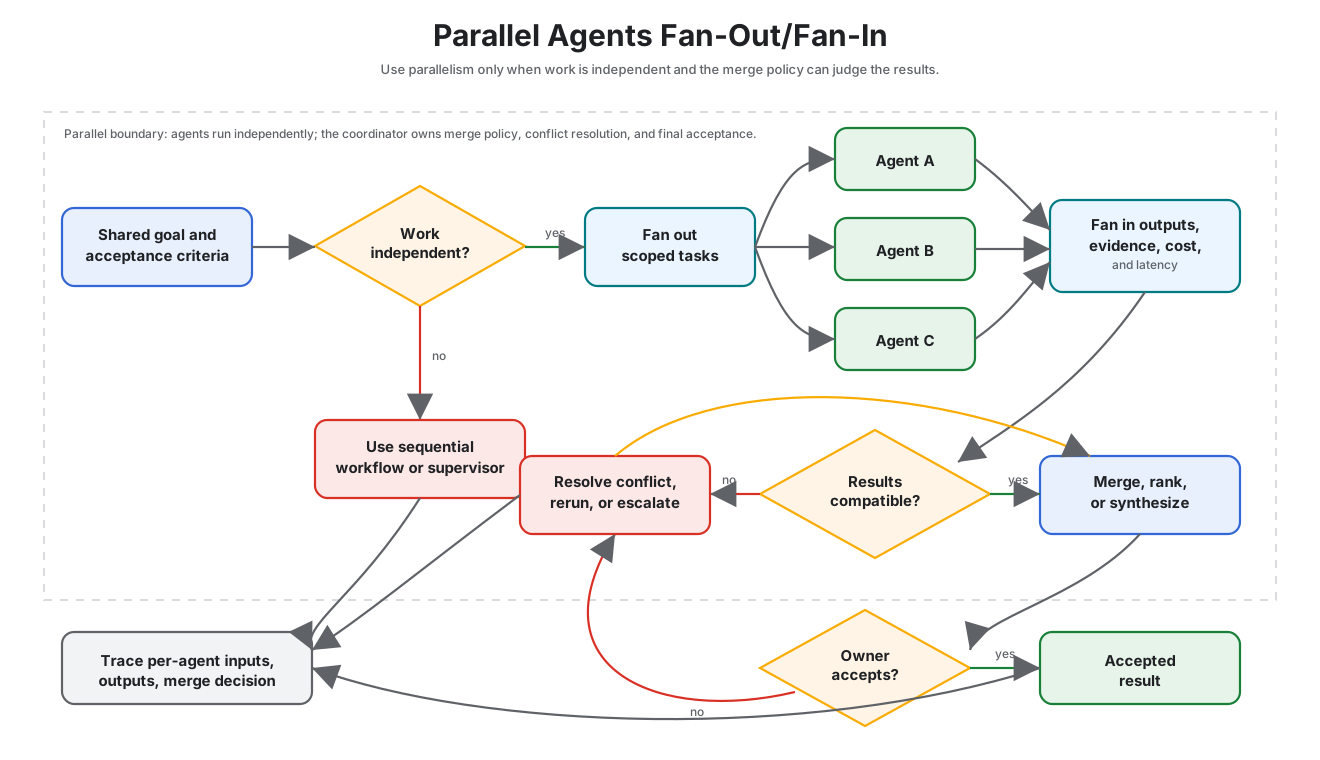
Read it as a fan-out/fan-in boundary: parallelism is useful only when workers are independent and the coordinator can compare, merge, or reject their outputs.
System Shape
- Pattern boundary: a coordinator delegates bounded work to agents with narrow roles, then evaluates and merges their outputs.
- State owner: the coordinator owns the shared goal, decomposition, assignments, merge policy, and final acceptance.
- Primary artifact:
multi-agent-collaboration-pattern/contains the runnable reference implementation and examples. - Operational promise: Parallel agents run independent work concurrently, then merge results through a fan-out/fan-in control point.
- Runnable path: start with
npm run multi-agent-collabbefore adapting the pattern to a larger system.
Core Protocol
- Define the shared goal, worker roles, expected outputs, and acceptance criteria.
- Split work only where independent or specialist execution adds value.
- Dispatch tasks with scoped context and permissions.
- Collect outputs, errors, refusals, and evidence from each worker.
- Merge results through an explicit judge, reducer, supervisor, or human review gate.
Implementation Notes
- Keep the pattern boundary explicit: inputs, state, side effects, and outputs should be visible.
- Validate model-produced decisions before they affect tools, users, or durable state.
- Emit enough trace data to debug failures after the run.
Failure Modes
- The pattern is applied where a simpler deterministic workflow would be better.
- State, tool calls, or model decisions are not observable enough to debug.
- The system lacks clear stop, retry, or escalation behavior.
Evaluation Strategy
- Compare multi-agent output against a single-agent baseline on the same tasks.
- Test worker disagreement, worker failure, duplicated work, and bad merge decisions.
- Measure quality lift, latency cost, token cost, merge accuracy, and accountability.
- Include cases that prove each “Use When” condition is true for this pattern.
- Include negative cases from “Avoid When” so the system chooses a simpler or safer pattern when appropriate.
Production Checklist
- Give every worker a narrow contract and permission set.
- Make the merge policy explicit before workers run.
- Log per-worker inputs, outputs, and decision evidence.
- Keep one owner for final acceptance and escalation.
- Define human escalation for ambiguous, high-risk, or policy-blocked work.
- Keep the source bundle, generated chapter, tests, and deployment artifact in the same release.
Run the Example
npm run multi-agent-collab
Code Walkthrough
Read the excerpt as the smallest executable expression of the pattern. The surrounding chapter explains the design constraints; the code shows where those constraints become concrete interfaces, state, validation, or control flow.
Source Code
These excerpts show the implementation shape. The complete code is available in the download bundle and repository source.
multi-agent-collaboration-pattern/autogen_typescript_example/multi_agent_collab.ts
// Multi-Agent Collaboration Pattern - Autogen TypeScript Example
// To run: npm install && npm run multi-agent-collab

import axios from 'axios';
import * as readline from 'readline';
import * as dotenv from 'dotenv';
dotenv.config();

const MISTRAL_API_URL = 'https://api.mistral.ai/v1/chat/completions';
const MISTRAL_API_KEY = process.env.MISTRAL_API_KEY;

async function agent(name: string, role: string, input: string): Promise<string> {
  const prompt = `You are ${name}, your role is: ${role}. Here is your input: ${input}`;
  const response = await axios.post(
    MISTRAL_API_URL,
    {
      model: 'mistral-tiny',
      messages: [{ role: 'user', content: prompt }],
    },
    {
      headers: {
        'Authorization': `Bearer ${MISTRAL_API_KEY}`,
        'Content-Type': 'application/json',
      },
    }
  );
  return response.data.choices[0].message.content;
}

async function multiAgentCollab(task: string) {
  // Agent 1: Idea Generator
  const idea = await agent('Alice', 'Idea Generator', task);
  console.log('Alice (Idea Generator):', idea);

  // Agent 2: Critic
  const critique = await agent('Bob', 'Critic', `Here is an idea: ${idea}\nPlease critique or improve it.`);
  console.log('Bob (Critic):', critique);

  // Agent 1: Finalize
  const final = await agent('Alice', 'Idea Generator', `Here is the critique: ${critique}\nPlease finalize the solution.`);
  console.log('Alice (Finalized):', final);
}

const rl = readline.createInterface({
  input: process.stdin,
  output: process.stdout
});

rl.question('Task: ', async (userInput: string) => {
  try {
    await multiAgentCollab(userInput);
  } catch (err) {
    console.error('Error:', err);
  }
  rl.close();
});
multi-agent-collaboration-pattern/langgraph_python_example/multi_agent_collab.py
# Multi-Agent Collaboration Pattern - LangGraph Python Example
This example demonstrates the Multi-Agent Collaboration Pattern using LangGraph and Python. Two agents (an Idea Generator and a Critic) collaborate to solve a task, exchanging messages and refining the solution. The LLM is Mistral.
## Requirements
- Python 3.8+
- `langgraph` library
- `python-dotenv` (for .env support)
- Mistral LLM API access
## Install dependencies
```bash
pip install langgraph python-dotenv requests
```
## Example Code
```python
import os
from langgraph import Agent, Environment, LLM
from dotenv import load_dotenv
load_dotenv()
MISTRAL_API_KEY = os.getenv("MISTRAL_API_KEY")
MISTRAL_API_URL = "https://api.mistral.ai/v1/chat/completions"
class SimpleEnvironment(Environment):
def get_observation(self):
return input("Task: ")
def send_action(self, action):
print(action)
class IdeaGenerator(Agent):
def __init__(self, llm):
self.llm = llm
def act(self, observation):
prompt = f"You are Alice, an Idea Generator. Here is your task: {observation}"
return self.llm.complete(prompt)
class Critic(Agent):
def __init__(self, llm):
self.llm = llm
def act(self, idea):
prompt = f"You are Bob, a Critic. Here is an idea: {idea}\nPlease critique or improve it."
return self.llm.complete(prompt)
llm = LLM(
provider="mistral",
api_key=MISTRAL_API_KEY,
api_url=MISTRAL_API_URL,
)
env = SimpleEnvironment()
idea_agent = IdeaGenerator(llm)
critic_agent = Critic(llm)
task = env.get_observation()
idea = idea_agent.act(task)
print("Alice (Idea Generator):", idea)
critique = critic_agent.act(idea)
print("Bob (Critic):", critique)
final = idea_agent.act(f"Here is the critique: {critique}\nPlease finalize the solution.")
print("Alice (Finalized):", final)
```
---
- Try a creative or open-ended task to see agent collaboration.
- Make sure your `.env` file contains your Mistral API key.
Download
The download bundle contains the current multi-agent-collaboration-pattern/ folder from this repository.